
3 Best Dash Cameras for Everyday Drivers
When choosing a dash camera for your daily drive, you want reliable footage without the fuss. We’ve tested models with 4K resolution, ultra-wide lenses, and night vision that actually works—no more blurry pointless clips at dawn. The top picks now also feature parking mode and smart connectivity, making sure you’re covered whether on the road or parked. Curious which models stand out and how they compare in real-world use? Let’s explore what makes a dash cam trustworthy in 2026.
REDTIGER 4K STARVIS 2 Dash Cam with Front and Rear Cameras
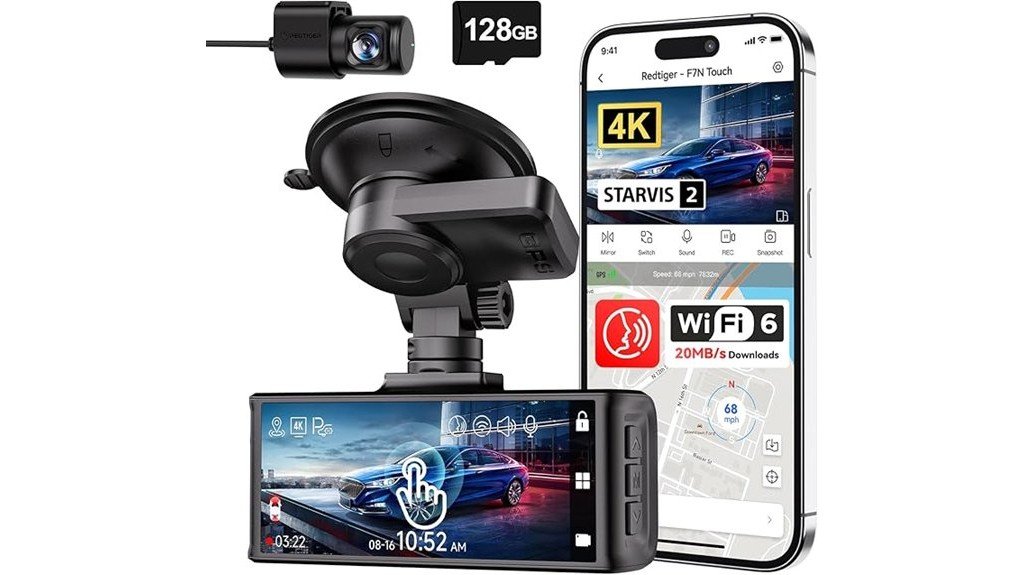
Looking for a good dash cam? The REDTIGER 4K STARVIS 2 with front and rear cameras is a great choice. It’s built for everyday use and offers high-quality video without being hard to use. The 4K UHD recording makes your footage clear, even in low light, thanks to the STARVIS 2 sensor. The camera has a wide 170° view at the front and a 140° view at the back, so you get a big look at what’s around you while driving.
It also has helpful features like built-in GPS, WiFi, and voice control. These make it easy to manage and look at your footage. The loop recording and impact detection help save important clips automatically. All of this makes the REDTIGER dash cam a good mix of smart tech and simple use.
This dash cam is best for drivers who want a high-quality camera. It covers both the front and rear of the car. It’s good for night driving with its clear night vision. Plus, smart features keep everything easy to control and manage.
Pros:
- Sharp 4K UHD video quality with STARVIS 2 sensor for better low-light videos.
- Wide views (170° front, 140° rear) for lots of coverage.
- Built-in GPS, WiFi, and voice control make it easy to use.
Cons:
- Needs a separate hardwire kit for parking mode and 24/7 security.
- Setup can be tricky for new users because of all the features.
- Its size is a bit big, so it may stand out on your windshield.
This dash cam is a solid choice for anyone who wants reliable, easy-to-use camera tech for everyday driving.
BOTSLAB 4K Dash Cam with Front and Rear Cameras
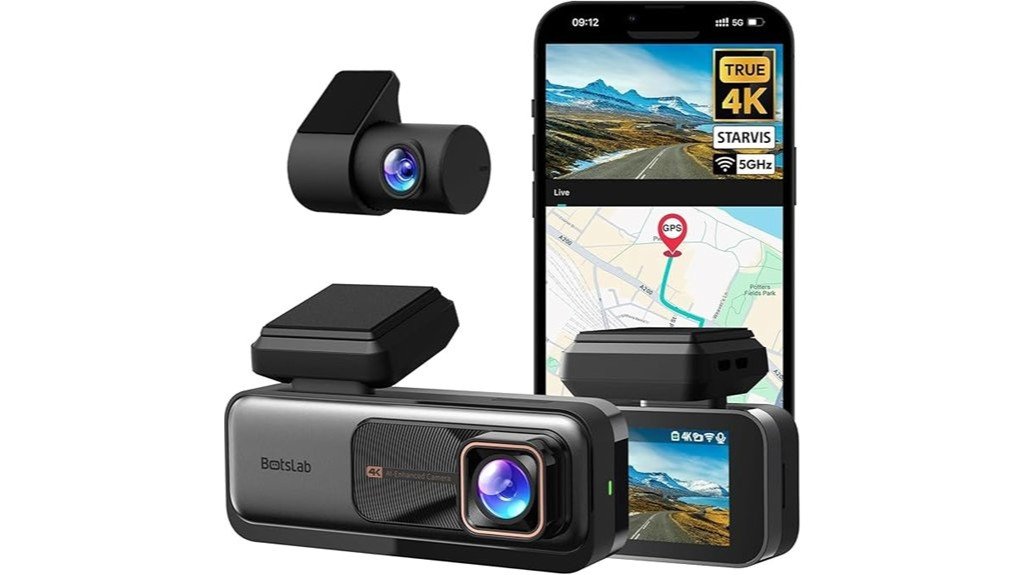
The BOTSLAB 4K Dash Cam with Front and Rear Cameras is a great choice for drivers who want clear video footage and smart safety features. The front camera has a true 4K resolution, thanks to a Sony IMX 415 sensor. This means the video is sharp and clear, even in dark or bright light. The front camera has a wide 170° view, covering almost everything ahead. The rear camera gives 2K quality with a 150° view, so you see behind your car also clearly.
Thanks to Wide Dynamic Range (WDR) tech and good night vision, license plates stay readable even in low light. We tested the camera, and the video quality really impressed us. It’s perfect for protecting you in case of accidents or incidents.
Best for: Drivers who want high-quality video recording, safety features, and easy connectivity for daily use and accidents.
Pros:
- Sharp 4K video in front and 2K in rear with Sony IMX 415 sensor.
- Smart AI features and GPS logging help track routes and improve safety.
- Easy to install, use with an app, and includes loop recording.
- Good build quality makes it last longer.
Cons:
- The rear camera records at 1080p at 60 fps, which can cause motion blur at high speeds and make license plates harder to read.
- You need extra hardware, like hardwire kits, for 24/7 parking mode. This costs more.
- The SD card storage can be limited; bigger cards over 64GB might be necessary for longer recordings.
IIWEY N5 4-Channel Dash Cam with 360° View and 128GB SD Card
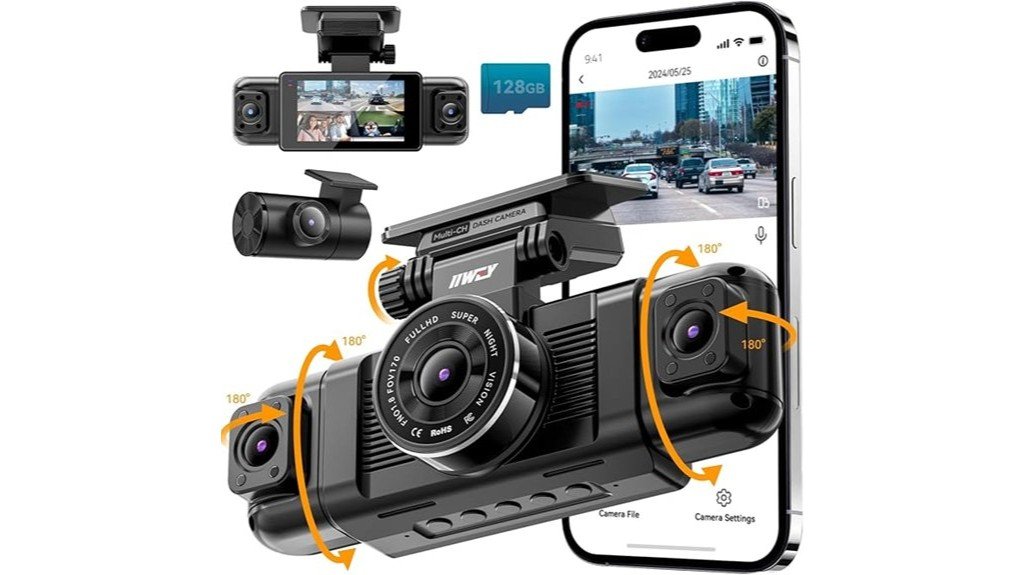
The IIWEY N5 4-Channel Dash Cam is a great choice for drivers who want full coverage of their vehicle. It has four cameras that give you a 360° view. The front and rear cameras show 170° wide angles, while the side cameras cover 150° each. This means you can see almost everything around your car, helping you stay safe on the road.
The dash cam records in 1080P Full HD, which gives clear pictures during the day. You can also switch to a higher setting with 2.5K + 1080P + 1080P + 1080P for even sharper footage. At night, infrared lamps help you see clearly in the dark, making night drives safer.
It comes with a 128GB SD card already installed, so you’re ready to record from the start. The built-in G-sensor detects impacts and saves important footage automatically. This helps protect your clips if something hits your car.
Best for: Drivers who want complete 360° coverage and high-quality video, especially at night. It is good for people who want a camera that locks important moments automatically.
Pros:
- Four wide-angle cameras give full coverage for your vehicle.
- Records in clear 1080P, with a simple switch to better quality if needed.
- Has infrared lights for good night vision, plus a super-capacitor for durability.
Cons:
- It doesn’t have GPS or OBD features to track your vehicle or check engine info.
- WiFi turns off after 5 minutes, which may stop live viewing sometimes.
- You need to buy a separate hardwire kit if you want parking mode, adding extra cost and setup time.
This dash cam is easy to use, offering a full view of your car’s surroundings. It records sharp video, even at night, and protects your important clips automatically. It’s a simple yet powerful tool for drivers who want to see everything happening around their vehicle.
Factors to Consider When Choosing Dash Cameras for Everyday Drivers
When choosing a dash camera, we understand you want clear video resolution, especially for capturing details like license plates—think 1080p or higher for sharp images. Night vision matters too; we’ve tested models that brighten up dark roads so you’re not left in the dark—literally. And don’t forget about storage; a capacity of at least 32GB is a solid start, but if you record frequently or in 4K, 128GB or more keeps your footage safe without constant offloading.
Video Resolution Clarity
Choosing a dash camera with good video quality is important if you want clear footage. Higher resolutions like 4K give sharp, detailed videos. This makes it easy to read license plates and see hazards. My 4K camera actually helped me in a small hit-and-run! But 1080P resolution is good enough for most daily use. It gives clear pictures without using too much storage space.
Using wide-angle lenses along with high resolution helps you see more of your surroundings. This can reduce blind spots. Good image processing features like WDR and HDR make footage look clear even in tricky lighting.
Pick a resolution that gives enough detail without taking up too much space. When you do, you get clear footage when you need it most.
Night Vision Capability
Night vision is a big help for dash cameras. It works well after dark when it’s hard to see. Some cameras use special sensors like STARVIS 2 or Sony IMX. These sensors catch more light, so images look clearer in low light. They also reduce noise, making the video smoother.
Infrared lights or other night vision tech can make dark scenes brighter. This makes the footage easier to see. Features like Wide Dynamic Range (WDR) and HDR help keep the picture balanced. When lights change suddenly, these features make sure your video stays clear.
Good sensors and night vision help you see license plates and details, even in the dark. This can be important if you need proof later. How you place your camera and the ambient light around you also matter. Proper placement helps get better night pictures.
From parking lots to dark streets, good night vision makes sure your recordings stay reliable when you need them the most.
Field of View Width
A wide view is very important when choosing a dash camera for daily driving. Cameras with a 170° or larger lens see more of the road. They show the lanes next to you and the side of the road. This gives you a full picture of what’s happening around your car. We have tested cameras with these wide angles. They help catch quick events outside your direct sight.
But be careful. A very wide lens can sometimes bend the image or cause distortion. This can make the footage look strange. The goal is to find a camera that shows enough to cover everything important. It should also give clear and accurate details.
Here’s a tip: pick a model that offers a wide view but also has high resolution. This way, your footage remains clear when you need it most. A good balance makes all the difference.
Storage Capacity Options
Once you know how wide the view is, think about how much video your dash camera can store. Storage usually ranges from 64GB to 512GB. You need enough space for your driving styles. If you record in 4K, it uses more room—up to 400MB every minute. Many cameras have loop recording. This means they delete old clips and save new ones when the memory fills up. So, it’s important to have enough space so you don’t miss important footage.
If you want to keep certain videos, some dash cams let you lock those clips. This way, they won’t get overwritten. Also, look for a microSD card slot. This lets you add more storage, so you decide how long to save your videos. Whether you want to review incidents or save your favorite drives, enough storage makes it easy.
Parking Monitoring Features
Parking monitoring features can help keep your car safe. These features are very useful for everyday drivers. We have tested many dash cameras. The best ones have 24/7 surveillance. When your car stays in one spot for a long time, these cameras turn on and record what happens. G-sensors act like your car’s security guards. They detect impacts and save the footage so it doesn’t get erased. Parking modes like time-lapse can save storage space during long waits. A good power source is also important. Hardwire kits or supercapacitors keep the camera running without draining your car’s battery. A reliable parking monitor not only protects your car but also gives you peace of mind. It’s worth choosing one with features that turn your car into a watchful guard.
Connectivity and Apps
When choosing a dash camera, look for good connection features. The camera should support WiFi and Bluetooth. These help you connect your phone easily. Dual-band WiFi, which uses 2.4GHz and 5GHz, makes the connection more stable and faster. This is helpful when you want to send big video files. Think of it like the difference between slow and fast internet.
Use apps that are simple and easy to understand. You can watch live footage, change settings, and share videos right from your phone. No need to mess with small buttons or hard menus. Also, some dash cams have voice control. This lets you control the camera with your voice. You can keep your hands on the wheel and still manage the camera easily.
Ease of Installation
Getting your dash cam set up should be quick and easy. Many dash cams use simple mounts like suction cups or sticky pads. You just snap them into place, no tools needed. Reading clear instructions or watching simple online videos can help you set it up faster. Some dash cams connect to WiFi or Bluetooth. This lets you change settings without plugging in lots of wires. Check if your dash cam comes with all the mounts you need. Some models have built-in screens or smartphone apps. These make it easy to position the camera just right. It’s also a good idea to choose a dash cam with cable management options. This keeps wires neat and out of the way. The easier the install, the sooner you’re ready to drive and record your trip.
Safety and Accident Recording
Choosing the right dash camera can seem hard. But if you focus on a few simple features, you can pick a good one easily.
Look for an option with G-sensors. These sensors lock the footage automatically if there is a big bump or crash. This keeps important video safe and from being erased.
High-resolution video is important too. Cameras that record in 4K or 2K plus 1080P show clear license plates and details. Even if the video is shaky, you can still see what happened.
A wide-angle lens with 170 degrees or more is helpful. It captures more of the road and surroundings. This extra view can make a difference when you need to understand an accident.
Night time is easier with night vision. Cameras with STARVIS sensors or infrared lights help record clearer videos in low light or at night.
Make sure the camera has loop recording. That means it keeps recording over old videos when storage is full. Also, emergency lock features save important clips during a crash.
These features help you record accidents confidently. They make your dash camera a useful tool for safety on the road.
Frequently Asked Questions
How Do Dash Cameras Impact Insurance Claims and Rates?
Dash cameras can positively impact your insurance claims by providing clear evidence, potentially reducing fraud and disputes, which might lead to lower rates. You’re more likely to get fair claims processing, saving money and hassle in the long run.
What Is the Average Lifespan of a Dash Camera?
Most dash cameras last around three to five years, depending on usage and build quality. You can extend their lifespan by regularly updating software, cleaning lenses, and protecting them from extreme temperatures or physical damage.
Are Dash Cameras Legal to Use in All States or Countries?
Dash cameras are generally legal in most states and countries, but laws vary. You should check specific regulations, especially regarding recording audio or video without consent, to make certain you’re compliant and avoid potential legal issues.
How Does Weather Affect Dash Camera Performance?
Weather can impact your dash camera’s performance by causing lens fogging, obstructing the view with snow or rain, and affecting video quality due to extreme temperatures; make certain your camera is weatherproof for reliable footage regardless of conditions.
Can Dash Cameras Record Audio Conversations Legally?
Yes, dash cameras can record audio conversations, but legality varies by jurisdiction. You should be aware of local laws, obtain necessary consent, and use recordings responsibly to avoid privacy violations or legal issues.

Iris is a passionate tech enthusiast dedicated to helping consumers make informed technology decisions through honest, detailed product reviews and comprehensive buying guides.